LiDAR Object Detection 🔒
This template creates a LiDAR object detection Interface for reviewing and editing 3D cuboid annotations on a point cloud, with synchronized bird’s-eye, perspective, and camera-reprojection views and a multi-track timeline for keyframe-based editing.
Annotators scrub through a multi-frame scene, draw and adjust cuboids in the bird’s-eye view, watch each object reproject into six camera images for sanity-checking calibration, manage per-object visibility segments and keyframes on a timeline, and capture review notes and ground-truth flags — producing the rich, track-level output autonomous-driving and robotics teams need for 3D object detection.
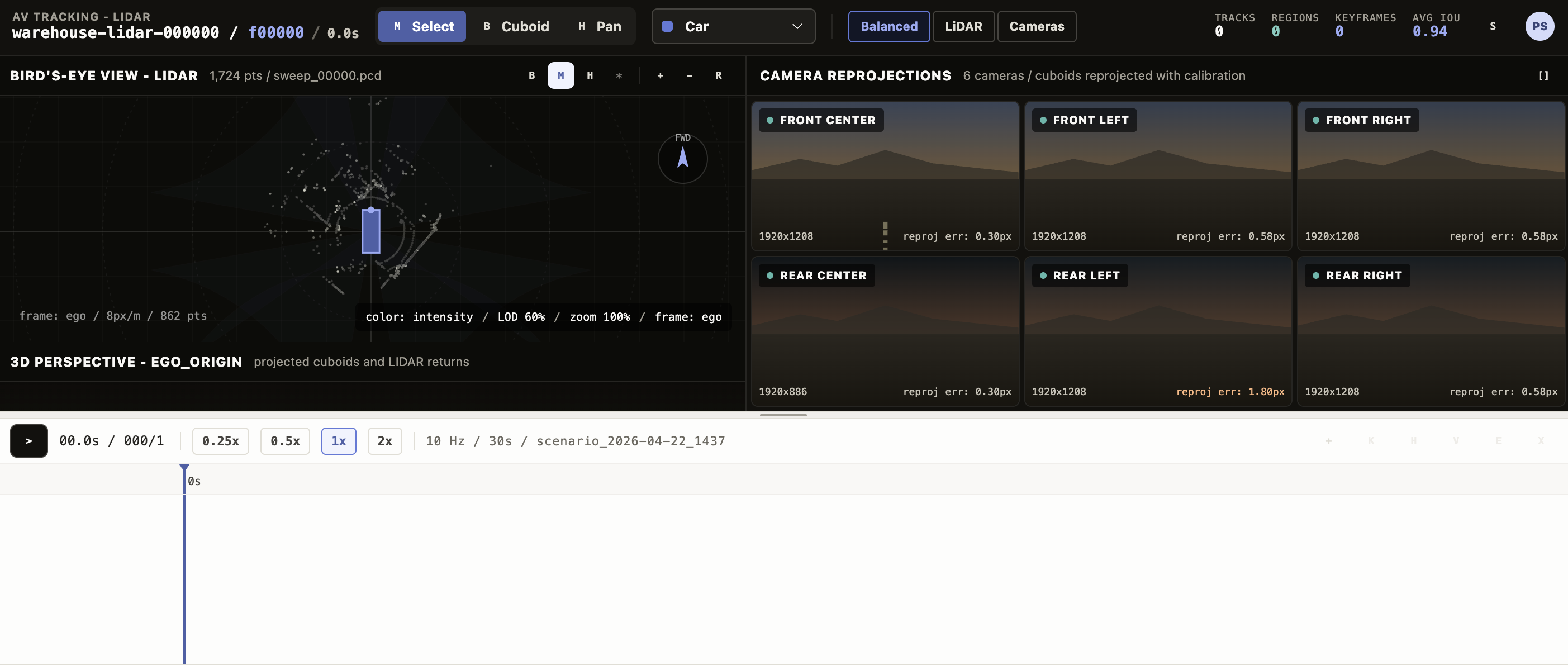
The example Interface includes:
- Bird’s-eye view (BEV) — Top-down view of the point cloud with the ego vehicle at the center, camera frustum overlays, and click-and-drag cuboid creation.
- Perspective 3D view — A camera-angle view of the same scene with the same cuboids rendered in 3D.
- Camera reprojection grid — Six synthetic camera tiles (front center / left / right and rear center / left / right) showing each cuboid reprojected onto the corresponding image using the camera’s yaw, FOV, and resolution.
- Timeline with per-track lanes, draggable visibility segments, keyframe markers, playback controls (play/pause, speed 0.25x-2x), and a frame scrubber.
- Track editor panel for the selected region with cuboid-pose sliders (X / Y / Z / width / length / height / yaw), occlusion markers, notes, and review status.
- Settings panel for view-only controls — point style, point size, level of detail, BEV zoom and offset, and projection toggles.
- Configurable labels — Defaults are
Car,Truck,Pedestrian,Cyclist; rename, recolor, or extend via thelabelsparam.
Enterprise
Interfaces can only be used in Label Studio Enterprise and Starter Cloud.
note
To use template Interfaces, you must first create an editable copy of the Interface. From Interfaces >Templates, select the overflow menu next to the template you want to use and click Duplicate.
Interface UI
The Interface is divided into a top toolbar, two stacked viewport rows (3D views above cameras), a timeline at the bottom, and two slide-out side panels (settings and track editor).
Top bar
A sticky toolbar with the scene identity and global controls.
- Scene label on the left, derived from
data.frameordata.sceneand shown alongside the current frame number. - Tool toggle with three tools: Move (
1), Rectangle (2, for drawing new cuboids in the BEV), and Hand (3, for panning). - Layout switch to cycle between Balanced (BEV + 3D + cameras), BEV focus, and Camera focus.
- Active label picker for the label applied to the next cuboid you create — drawn from the
labelsparam. - Settings toggle that opens the right-side settings panel.
LiDAR panes
Two side-by-side viewports rendering the point cloud.
- Bird’s-eye view (BEV) — Top-down projection with grid lines, the ego vehicle, and optional camera-frustum overlays. With the Rectangle tool active, drag to create a new cuboid at the playhead frame; the new region inherits the Active label.
- Perspective 3D view — A 3D camera-angle render of the same cuboids and points. Selecting a region in either view selects it in the other.
- The settings panel controls Point style (
intensity,height,solid), Point size, and Level of detail (a 0-1 slider that downsamples for performance).
Camera reprojection grid
Below the LiDAR panes, six camera tiles show every cuboid reprojected onto a synthetic image using the camera’s yaw, FOV, and resolution.
- Cameras are fixed: Front Center, Front Left, Front Right, Rear Center, Rear Left, Rear Right.
- Clicking a tile focuses just that camera; clicking again returns to the grid.
- Hovering or selecting a track in any view highlights it in every camera tile that sees it.
Timeline
A bottom panel with playback controls and a per-track lane stack.
- Playback controls — Play/pause (also
Space), step controls (orArrowLeft/ArrowRight, holdShiftfor ten-frame jumps), and a speed selector. - Frame scrubber with the current frame indicator.
- Per-track lanes — One row per region. Each lane shows colored visibility segments (the frame ranges where the object is present), keyframe diamonds, and occlusion gaps. Drag a segment edge to resize it.
- Track actions in the lane header — New track, Add keyframe at the playhead, End visible to terminate the segment at the playhead, Resume visible to start a new segment, Edit to open the right-side track editor, and Delete.
Settings panel
A right-side slide-out, opened from the top bar. Read-only controls that change how the scene renders without modifying any region.
- View settings — Frame of reference (
egoorworld), point style, point size, level of detail, BEV zoom, BEV offset, and a Show projection toggle for the camera-frustum overlays. - Calibration — Per-camera yaw, FOV, and resolution display for sanity-checking the reprojection.
Track editor panel
A right-side slide-out for the currently selected region, opened via the timeline lane’s Edit action.
- Pose sliders — X / Y / Z (meters), width / length / height (meters), and yaw (radians).
- Label dropdown, Source (
human/model), Confidence badge, Verified flag, Review status (accepted,needs_review,rejected,ground_truth), and a Notes textarea. - All edits propagate to the cuboid in every view and write back to the track’s keyframe at the playhead frame.
React code
The full Screen.jsx source is roughly 2,900 lines, so the snippets below highlight the parts you are most likely to customize:
- The params you wire to your task data,
- The default label set used for the active-label picker, BEV cuboid colors, and the timeline,
- The camera array used for reprojection,
- The result shape it writes back to Label Studio.
Interface params
Set or rename a param on the Interface config to point at a different task field or to replace the label set. The defaults mirror the example input below.
paramsSchema: {
  type: "object",
  properties: {
    pointCloudField: {
      type: "dataField",
      default: "points",
      description: "Task data field containing LiDAR point samples",
    },
    labels: {
      type: "labels",
      default: DEFAULT_LABELS,
      description: "Object labels",
    },
  },
}
The Interface also reads frame_index (or frame) and total_frames from the task data when present; if absent, the scene starts at frame 0 of a single-frame clip.
Default labels
DEFAULT_LABELS drives the active-label picker, the timeline lane swatches, and the BEV/3D cuboid colors. Edit it in place to rename, recolor, or extend the label set — the name is what gets persisted as the choices[0] value on each region.
const DEFAULT_LABELS = [
  { name: "Car",        color: "#617ada" },
  { name: "Truck",      color: "#3287e2" },
  { name: "Pedestrian", color: "#e69559" },
  { name: "Cyclist",    color: "#34988d" },
];
Cameras
CAMERAS defines the six reprojection tiles. Each entry’s yaw, fov, and res drive how cuboids are projected onto that camera’s image. Add, remove, or recalibrate cameras here.
const CAMERAS = [
  { id: "front_center", name: "Front Center", yaw: 0,               fov: 60,  res: "1920x1208" },
  { id: "front_left",   name: "Front Left",   yaw: -Math.PI / 4,    fov: 70,  res: "1920x1208" },
  { id: "front_right",  name: "Front Right",  yaw:  Math.PI / 4,    fov: 70,  res: "1920x1208" },
  { id: "rear_center",  name: "Rear Center",  yaw:  Math.PI,        fov: 110, res: "1920x886"  },
  { id: "rear_left",    name: "Rear Left",    yaw: -Math.PI * 3 / 4, fov: 70, res: "1920x1208" },
  { id: "rear_right",   name: "Rear Right",   yaw:  Math.PI * 3 / 4, fov: 70, res: "1920x1208" },
];
Keyboard shortcuts
Hotkeys live in the top-level LidarObjectDetectionScreen component. Add or remap a key here.
function onKey(event) {
  if (event.target?.tagName === "INPUT" || event.target?.tagName === "TEXTAREA") return;
  if (event.code === "Space") {
    event.preventDefault();
    setPlaying((value) => !value);
  } else if (event.code === "ArrowLeft") {
    setFrame((value) => clamp(value - (event.shiftKey ? 10 : 1), 0, sceneData.TOTAL_FRAMES - 1));
  } else if (event.code === "ArrowRight") {
    setFrame((value) => clamp(value + (event.shiftKey ? 10 : 1), 0, sceneData.TOTAL_FRAMES - 1));
  } else if (event.key === "1") setTool("move-tool");
  else if (event.key === "2") setTool("rectangle-tool");
  else if (event.key === "3") setTool("hand-tool");
}
Result shape
getResults emits one Label Studio result per track. Every result uses from_name: "objects", to_name: "points", and type: "choices", and the cuboid pose, visibility segments, keyframes, and review metadata are serialized into value. Coordinates are in meters in the ego-vehicle frame (coordinate_system: "ego_vehicle_meters").
function getResults(regions) {
  // Emits one result per track with from_name: "objects", to_name: "points", type: "choices".
  // value: {
  //   choices: [label],
  //   track_id, source_track_id?, frame,
  //   x, y, z, width, length, height, yaw,     // cuboid pose at the saved frame
  //   point_count, coordinate_system: "ego_vehicle_meters",
  //   birth, death,                            // first and last visible frame
  //   segments: [{ start, end }, ...],         // visibility ranges across the scene
  //   keyframes: [{ f, x, y, z, width, length, height, yaw }, ...],
  //   notes?, review_status?, ground_truth?
  // }
}
Example input
The Interface expects a task data object with a points array of { x, y, z, intensity } samples and optional frame / frame_index / total_frames fields. An optional tracks array seeds prepopulated annotations (for example, from a model run) that the annotator then reviews and edits.
Click to expand
{
  "data": {
    "frame": "warehouse-lidar-000000",
    "frame_index": 0,
    "total_frames": 300,
    "points": [
      { "x": -0.872, "y": 3.857,  "z": -1.060, "intensity": 0.008 },
      { "x": -0.498, "y": 4.217,  "z": -1.138, "intensity": 0.024 },
      { "x":  0.611, "y": 6.370,  "z": -1.725, "intensity": 0.016 },
      { "x": -1.806, "y": -3.290, "z": -0.594, "intensity": 0.024 }
      // ... typically thousands of points per frame
    ],
    "tracks": [
      {
        "id": 17,
        "label": "Car",
        "birth": 0,
        "death": 299,
        "source": "human",
        "confidence": 0.99,
        "verified": true,
        "keyframes": [
          { "f": 0,   "x": 0.4, "y": 22.0, "z": 0.7, "w": 1.85, "l": 4.6, "h": 1.55, "yaw": 1.5708 },
          { "f": 140, "x": 0.6, "y": 14.2, "z": 0.7, "w": 1.85, "l": 4.6, "h": 1.55, "yaw": 1.6508 },
          { "f": 299, "x": 2.6, "y":  9.8, "z": 0.7, "w": 1.85, "l": 4.6, "h": 1.55, "yaw": 1.7908 }
        ]
      },
      {
        "id": 23,
        "label": "Pedestrian",
        "birth": 40,
        "death": 260,
        "source": "model",
        "confidence": 0.88,
        "occlusions": [[145, 168]],
        "keyframes": [
          { "f": 40,  "x":  4.5, "y": 28.0, "z": 0.9, "w": 0.7, "l": 0.5, "h": 1.78, "yaw": 3.1416 },
          { "f": 180, "x": -3.0, "y": 27.5, "z": 0.9, "w": 0.7, "l": 0.5, "h": 1.78, "yaw": 3.1416 },
          { "f": 260, "x": -6.0, "y": 27.4, "z": 0.9, "w": 0.7, "l": 0.5, "h": 1.78, "yaw": 3.1416 }
        ]
      }
    ],
    "metadata": {
      "dataset": {
        "name": "Voxel51/lidar-warehouse-dataset",
        "url": "https://huggingface.co/datasets/Voxel51/lidar-warehouse-dataset",
        "license": "cc-by-sa-4.0",
        "sensor": "Velodyne Puck VLP-16",
        "coordinate_transform": "source [x_forward, y_left, z_up, rgb] mapped to task {x: y_left, y: x_forward, z, intensity}"
      }
    }
  }
}
Points use the ego-vehicle frame in meters, with x to the left, y forward, and z up. Intensity is normalized 0-1.
Example output
The saved annotation contains one result per track. The example below shows two tracks — a Car with five keyframes spanning the full scene, and a Pedestrian with a mid-scene occlusion gap captured as two visibility segments.
{
  "result": [
    {
      "id": "lidar-track-17",
      "from_name": "objects",
      "to_name": "points",
      "type": "choices",
      "value": {
        "choices": ["Car"],
        "track_id": 17,
        "source_track_id": 17,
        "frame": 140,
        "x": 0.6, "y": 14.2, "z": 0.7,
        "width": 1.85, "length": 4.6, "height": 1.55,
        "yaw": 1.6508,
        "point_count": 142,
        "coordinate_system": "ego_vehicle_meters",
        "birth": 0,
        "death": 299,
        "segments": [{ "start": 0, "end": 299 }],
        "keyframes": [
          { "f": 0,   "x": 0.4, "y": 22.0, "z": 0.7, "width": 1.85, "length": 4.6, "height": 1.55, "yaw": 1.5708 },
          { "f": 140, "x": 0.6, "y": 14.2, "z": 0.7, "width": 1.85, "length": 4.6, "height": 1.55, "yaw": 1.6508 },
          { "f": 299, "x": 2.6, "y":  9.8, "z": 0.7, "width": 1.85, "length": 4.6, "height": 1.55, "yaw": 1.7908 }
        ],
        "review_status": "accepted"
      }
    },
    {
      "id": "lidar-track-23",
      "from_name": "objects",
      "to_name": "points",
      "type": "choices",
      "value": {
        "choices": ["Pedestrian"],
        "track_id": 23,
        "source_track_id": 23,
        "frame": 180,
        "x": -3.0, "y": 27.5, "z": 0.9,
        "width": 0.7, "length": 0.5, "height": 1.78,
        "yaw": 3.1416,
        "point_count": 9,
        "coordinate_system": "ego_vehicle_meters",
        "birth": 40,
        "death": 260,
        "segments": [
          { "start": 40,  "end": 144 },
          { "start": 169, "end": 260 }
        ],
        "keyframes": [
          { "f": 40,  "x":  4.5, "y": 28.0, "z": 0.9, "width": 0.7, "length": 0.5, "height": 1.78, "yaw": 3.1416 },
          { "f": 180, "x": -3.0, "y": 27.5, "z": 0.9, "width": 0.7, "length": 0.5, "height": 1.78, "yaw": 3.1416 },
          { "f": 260, "x": -6.0, "y": 27.4, "z": 0.9, "width": 0.7, "length": 0.5, "height": 1.78, "yaw": 3.1416 }
        ],
        "notes": "Confirmed via rear-left camera, no occlusion at frame 180.",
        "review_status": "needs_review"
      }
    }
  ]
}